A workspace that follows user access
Dashboard shortcuts and navigation follow the same module permissions. Email, mailing, PDF tools, and history appear according to each user’s assigned access.
 A NextiClick product
Turn invoice PDFs into customer-specific emails and organized mailing packets. NickFlow brings document preparation, customer delivery rules, PDF tools, and batch history into one desktop workspace.
Desktop application in active development by Nexti Click Inc. Availability and deployment options are discussed case by case.
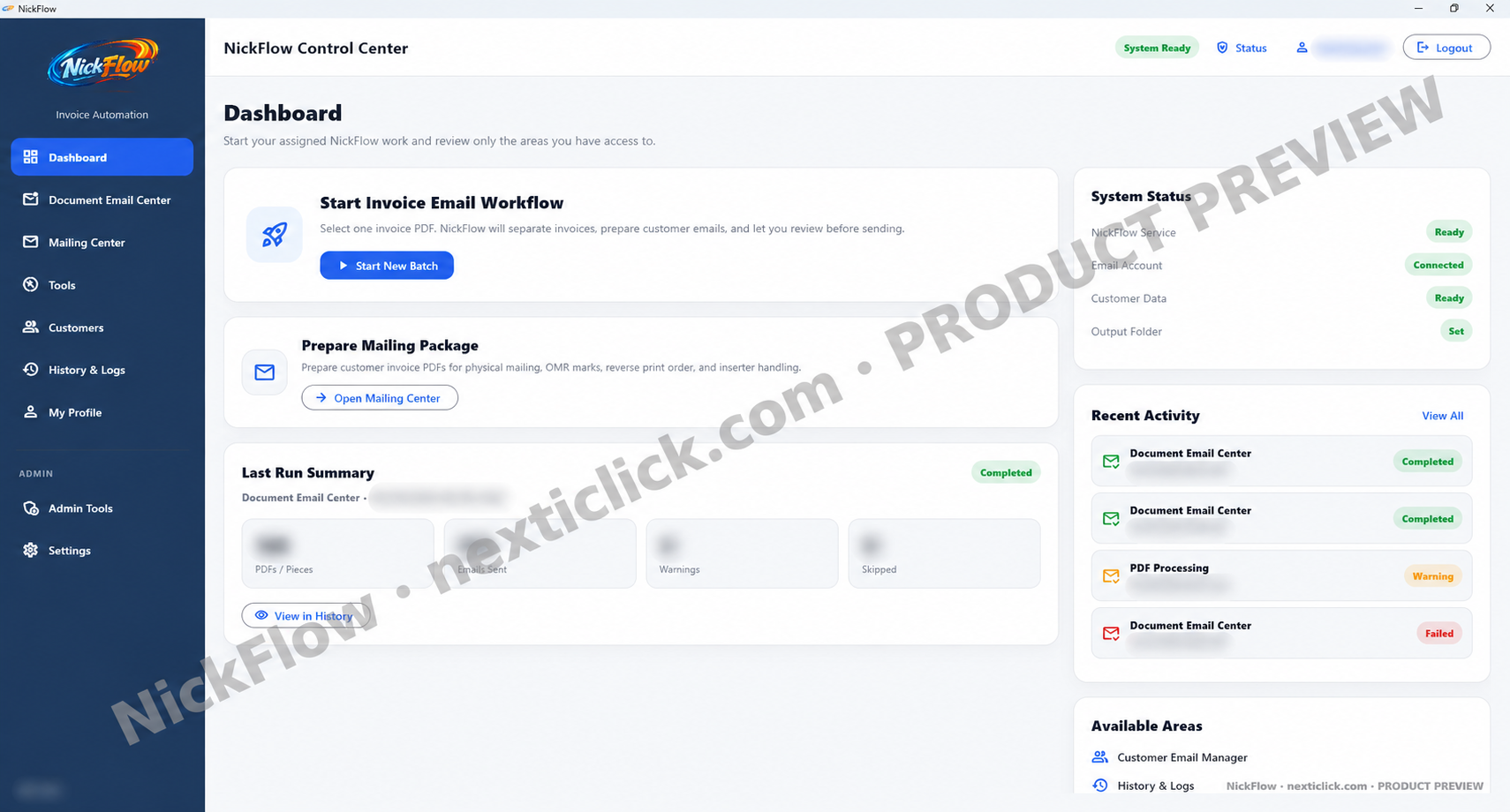 Explore the NickFlow Control Center
Recent builds improve recipient preparation, personal preferences, access, and shared batch history. These changes are in the development/pilot release; installation and workflow testing are confirmed for each deployment.
Dashboard shortcuts and navigation follow the same module permissions. Email, mailing, PDF tools, and history appear according to each user’s assigned access.
Use company subject/body defaults or choose a saved personal template for prepared emails. Sender-mailbox preferences and a default test recipient remain part of the user profile.
Combine selected CC sources from SQL/POS lookup, the NickFlow customer database, PDF zones, and fixed addresses. Duplicate CC addresses and addresses already in To are removed.
Completed mailing runs are saved to shared history with packet, invoice, page, and warning counts. Mailing records are kept separate from invoice-email duplicate-send tracking.
Users can choose an allowed startup page and view workstation status. Administrators manage providers, document templates, mailing marks, SQL lookup, and module access.
The latest development build adds local license requests, signed license installation, and activation status for each computer. Commercial availability and license terms are confirmed during your demo.
Explore actual NickFlow screens. Choose a menu or follow the tour to see what each area does and why it matters for your daily document work.
Launch an invoice batch or mailing job, check system readiness, and review recent activity.
Why it helps
A clear starting point helps staff find the right workflow without switching between separate tools.
This tour uses real screenshots from an earlier development build. The latest settings and profile changes are described above; the screenshots have not been recaptured. The tour does not run the application or send documents. Captured statuses and counts illustrate the interface and are not performance claims. Available modules depend on user permissions and installation setup.
NickFlow brings repetitive preparation work into one place, with tools for both invoice emailing and physical mail production.
Use document templates to locate customer numbers, invoice numbers, dates, page numbers, and email fields on incoming PDFs.
Keep the pages of each invoice together. Prepare several invoices for the same customer as one mailing group.
Review recipients, subject, body, and attachments before sending. Support To and CC addresses and multiple recipient values.
Group customer packets, configure OMR marks, and set print order for compatible sorter, folder, and inserter workflows. Equipment setup is checked for each machine model.
Read email addresses from a document or use customer data from SQL when the document does not carry them.
Give users access to their assigned modules, review batch history, and configure shared deployment settings. Sending safeguards are part of the workflow; confirm configuration during setup.
Split, merge, or extract pages and inspect PDFs without leaving the NickFlow workspace.
Manage To and CC addresses, credit flags, missing-email follow-up, and customer-specific rules for one invoice per attachment. Import and export customer lists.
Find completed runs, warnings, and failures. Inspect batch details and export logs to support follow-up and troubleshooting.
Generic PDF automation often focuses on files and rules. NickFlow is designed around invoice delivery decisions: the right pages, the right recipient, and the right output path.
Prepare customer-specific invoices with recipient review, editable messaging, and attachment options.
Group invoices by customer and generate print-ready batches for an OMR mail inserter workflow.
Identify invoice boundaries, keep pages together, and prepare customer-specific output from one PDF.
Teams can configure a template once, then use it across repeat batches with review where it matters.
Define the zones that identify each invoice, page, customer, and optional recipient. Different document layouts can use different templates.
NickFlow reads the PDF, assembles related pages, and surfaces information to inspect before output.
Prepare invoices for email with editable messaging, or generate a mailing batch with grouping and inserter marks.
Review exceptions, use history and logs to track processing, and complete the batch with appropriate controls.
NickFlow’s Mailing Center prepares customer packets for sorter, folder, and inserter workflows. Configurable OMR marks and print order let the output be adapted to compatible equipment rather than tied to one fixed page layout.
Ask about your machineFor automated grouping, the machine must support a compatible OMR reading scheme. Compatibility depends on the model, installed reader, mark definitions, feed direction, paper size, and packet limits. Share your machine’s make/model and reading specification so a sample batch can be checked before production.
NickFlow prepares the documents; the equipment performs sorting, folding, and insertion. Postal address sorting and direct machine control are not implied.
Designed for accounts receivable teams and other businesses that regularly distribute large volumes of customer documents.
Reduce manual splitting, naming, sorting, and repetitive email preparation across recurring document batches.
Keep invoice pages together and place review steps before emails or print batches leave the team.
Support customers who receive email, customers who need paper mail, and exceptions such as one invoice per attachment.
Use template zones and optional SQL customer lookup to handle documents whose recipient details live in different places.
NickFlow started with invoice mailing and email preparation. Nexti Click is shaping a broader document workflow product. These future items are plans, not promises of current availability.
The current desktop interface brings together the Document Email Center, Mailing Center, PDF tools, customer management, history, administrator access controls, and configuration for email providers and SQL/customer lookup.
Exact capabilities and deployment readiness should be confirmed for each installation.
NickFlow grew out of a practical need: processing recurring invoices without making staff repeat the same manual steps every week. Nexti Click Inc. (NextiClick) is developing software that connects document data, review, delivery, and accountability in a usable workflow.
Our approach begins with day-to-day operations. We focus on the details that matter when real customers, real invoices, and multiple team members are involved.
Questions about NickFlow? Email info@nexticlick.com.
Yes. Recent builds allow each user to choose company email defaults or a personal subject/body template for prepared emails. The batch still goes through recipient and attachment review before sending.
Mailing history is recorded separately from invoice-email duplicate tracking. This keeps the physical-mail record without treating that invoice as an email that was already sent.
NickFlow prepares grouped PDFs with configurable OMR marks and print order for compatible equipment. Automated page grouping depends on the machine’s reader and supported mark scheme. We check the model, reader options, feed direction, paper size, and packet limits with a sample batch before confirming support.
Yes. The workflow is designed to recognize invoice and page details, assemble pages by invoice, and group customer mailings where needed. Output should always be reviewed for unusual document layouts.
No. A configured template can read addresses from the document, while a SQL customer table can provide recipient information when the PDF does not contain it.
The invoice email workflow includes an option for customers who need one invoice per attachment. Team members can review the prepared email before sending.
The current administrator setup supports Microsoft 365 through Microsoft Graph and EML draft-file output. Custom SMTP and Google Workspace/Gmail are marked as coming soon. Microsoft 365 setup depends on the organization’s mailbox and security configuration.
NickFlow is being developed as a desktop application. Web, hosted, and customer portal options are part of the future product direction.
Recent builds include module-aware dashboards, user-scoped activity, persisted mailing history, and workstation licensing setup. A pilot checks shared data access, permissions, sender configuration, duplicate-send behavior, and physical mailing output before a wider rollout.
Tell us about your PDFs, customer delivery rules, email provider, and mailing equipment. We’ll focus the demo on your document workflow.
Questions? info@nexticlick.com
Demo requests submit here on the page. We’ll reply to the email address you provide.